Pointing Pair – Number Place (Sudoku) Solving Technique
Pointing Pair uses the relationship between 3×3 blocks and rows/columns. When a number’s candidates within a block are all aligned in one row or column, you can eliminate that number from other blocks in the same row or column. It is the counterpart to Box Line Reduction, which works in the opposite direction.
Basic Rules of Number Place
First, let's reconfirm the basic rules:
- Place the numbers 1–9 in each row, column, and 3×3 block.
- Do not repeat the same number in any row, column, or block.
- The puzzle is clear once all cells are correctly filled.
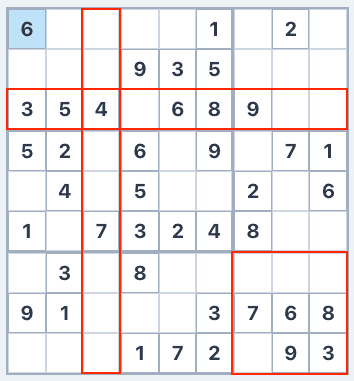
How to Use Pointing Pair
Within a block, check where a specific number’s candidates are located.
Check if all candidates for that number lie in the same row (or same column).
If they do, eliminate that number from cells in other blocks along the same row (or column).
Example
Suppose in the top-left block, ‘5’ can only go in two cells that are both in row 1. Since ‘5’ must be in row 1 within this block, you can remove ‘5’ from candidates in other blocks along row 1. In the diagram, ‘5’ is eliminated from a cell whose candidates were ‘2, 3, 5’.
Tips for Finding Pointing Pairs
Check each block to see if any number’s candidates all fall in one row or column. The same logic works whether there are 2 candidates (pair) or 3 (triple). This technique works well in combination with others. Eliminating candidates via Pointing Pair often reveals Naked Singles or Hidden Singles.